There’s nothing quite like slipping on a favorite pair of headphones and immersing yourself in a great song or podcast. However, over time, headphones and true wireless earbuds collect sweat, earwax, dead skin cells, and dirt. Not only can this accumulation degrade audio quality, but it can also become a breeding ground for bacteria, leading to ear infections.
If you wear your headphones at the gym, during your commute, or while working from home, regular cleaning is non-negotiable. This comprehensive guide will show you exactly how to properly clean and sanitize your earbuds and headphones, ensuring they sound pristine and remain hygienic for years to come.
Why You Must Clean Your Headphones Regularly
The dark, warm environment inside your ear canal is perfectly suited for bacterial growth. When you introduce earbuds into that environment, they act as a stopper, trapping moisture and heat. Over-ear headphones aren’t innocent either, as the ear pads soak up sweat and facial oils.
Consistent cleaning preserves the life of the drivers, prevents the ear pads from cracking or degrading prematurely, and keeps the sound signature accurate by preventing wax buildup on the acoustic mesh.
Tools You Will Need
Before you begin, gather the right tools. Avoid harsh chemicals like bleach or excessive water, which can destroy the delicate electronics inside your audio gear.
| Tool | Purpose |
|---|---|
| Microfiber Cloth | Wiping down exterior surfaces and ear pads without leaving scratches. |
| Isopropyl Alcohol (70%) | Sanitizing surfaces and cutting through stubborn oils safely. |
| Soft-Bristled Toothbrush | Gently brushing away dry wax and dirt from mesh screens. |
| Cotton Swabs (Q-tips) | Cleaning hard-to-reach crevices and charging case interiors. |
| Blu-Tack (or similar putty) | Pulling out stubborn earwax from the speaker mesh without pushing it in further. |
| Dish Soap and Warm Water | Soaking removable silicone or foam ear tips. |
How to Clean True Wireless Earbuds (In-Ear)
Earbuds like Apple AirPods, Samsung Galaxy Buds, or Sony WF-1000XM series require careful handling, especially around the speaker mesh.
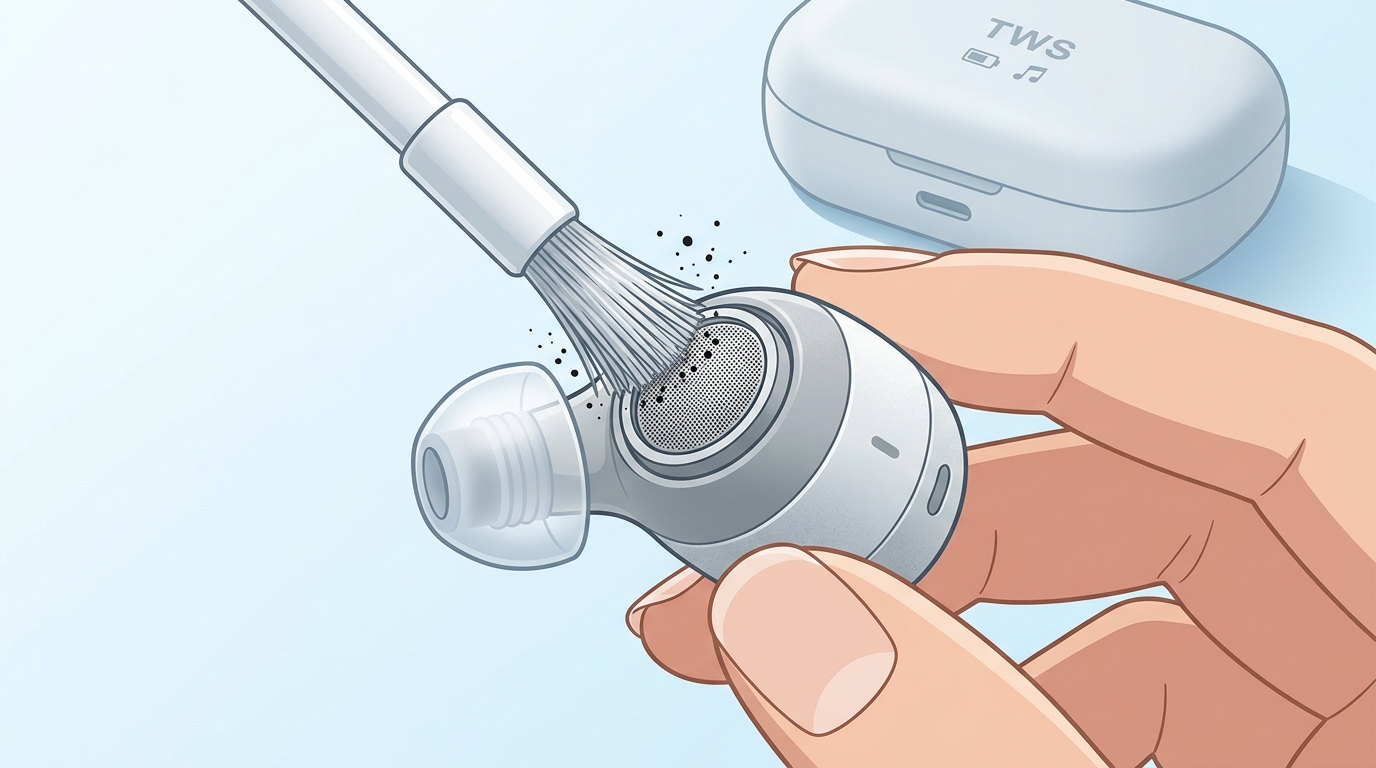
Step 1: Remove and Clean the Ear Tips
If your earbuds have silicone ear tips, pull them off gently. Create a mixture of warm water and a drop of mild dish soap. Submerge the silicone tips in this soapy water for about five minutes. Use a cotton swab to clear any gunk from the inside of the tips, then rinse them thoroughly with clean water. Crucially: Let them air dry completely before reattaching them. If you have foam tips (like Comply foam), do not soak them; just wipe them with a damp cloth.
Step 2: Clean the Speaker Mesh
Hold the earbud with the mesh facing down so gravity works in your favor. Take a dry, soft-bristled toothbrush and gently brush the mesh. This will dislodge dry wax and dirt so it falls out, rather than being pushed further into the driver.
If wax is stuck in the mesh, take a small piece of Blu-Tack or mounting putty, roll it into a ball, and gently press it against the mesh, then pull it away quickly. The wax will stick to the putty and come right out.
Step 3: Sanitize the Earbud Body
Lightly dampen a microfiber cloth or a cotton swab with 70% isopropyl alcohol. Wipe down the plastic exterior of the earbuds, avoiding the mesh screens completely. Alcohol evaporates quickly and will kill the bacteria living on the surface.
Step 4: Clean the Charging Case
The charging case often holds as much dirt as the earbuds themselves. Use a dry microfiber cloth to wipe the outside. For the inside, use a dry cotton swab to clean the slots where the earbuds sit. If there’s stubborn grime, lightly dampen the cotton swab with isopropyl alcohol, but be very careful not to get any liquid on the metal charging contacts.
How to Clean Over-Ear and On-Ear Headphones
Over-ear headphones collect a lot of sweat and skin oils, particularly on the ear pads and the headband.
Step 1: Remove the Ear Pads (If Possible)
Many premium headphones have removable ear pads. Check your manual to see if yours twist or pull off. Removing them makes it much easier to clean both the pads and the ear cups underneath.
Step 2: Clean the Ear Pads
How you clean the pads depends entirely on their material:
- Leather or Faux Leather (Pleather): Wipe them down with a microfiber cloth dampened with a small amount of soapy water. Follow up with a cloth dampened only with water to remove soap residue, then dry them. You can use leather conditioner on real leather pads to prevent cracking.
- Velour or Fabric: These act like sponges for sweat. You can use a lint roller to remove hair and dust. For a deeper clean, gently scrub them with a cloth dipped in a mixture of warm water and a tiny bit of laundry detergent. Press a dry towel against them to absorb excess moisture and let them air dry completely.
Step 3: Wipe Down the Headband and Ear Cups
Using a microfiber cloth slightly dampened with 70% isopropyl alcohol or soapy water, wipe down the hard plastic or metal outer surfaces of the ear cups and the top and bottom of the headband. Be gentle and ensure no liquid drips into the grilles or the headphone jacks.
Step 4: Clean the Ports
Use a dry toothbrush or a dry wooden toothpick to gently scrape out any lint or dust trapped in the USB charging port or the 3.5mm headphone jack.
Daily Maintenance Tips
To reduce the need for deep cleaning, follow these simple daily habits:
- Wipe them down after workouts: A quick wipe with a dry microfiber cloth after hitting the gym prevents sweat from soaking in.
- Store them properly: Keep them in their protective case when not in use. This prevents them from gathering dust and lint in your bag or pocket.
- Don’t share: Avoid sharing earbuds with others to prevent the cross-transfer of ear flora and bacteria.
By taking a few minutes every couple of weeks to clean and sanitize your headphones and earbuds, you can protect your ear health, extend the lifespan of your expensive audio gear, and ensure you’re always getting the best possible sound quality.
Discuss more about this, FAQ, Announcements and Miscellaneous, over on our community.
